
radFormatter is a non-destructive Delphi source code formatter for the RAD Studio IDE and the command line. It parses your source into a full syntax tree, decides spacing, line breaks, indentation, and alignment from real structure — and validates that nothing beyond whitespace and casing ever changes. If it would, your original file is returned untouched.
.pas.dpr.dpk.dpkw.inc
unit Demo;
interface
uses System.SysUtils, System.Classes;
implementation
procedure Test(A, B: Integer);
begin
  IF A>0 THEN DoIt(A);
  B:=A*2+1;
end;
end.
// Mixed casing, tight spacing, no blank lines. Pick a profile.
unit Demo;
interface
uses System.SysUtils, System.Classes;
implementation
procedure Test(A, B: Integer);
begin
  IF A>0 THEN DoIt(A);
  B:=A*2+1;
end;
end.
// Conservative: reindents structure, preserves your casing, spacing, and line breaks. This input was already tidy — unchanged.
unit Demo;

interface

uses System.SysUtils, System.Classes;

implementation

procedure Test(A, B: Integer);
begin
  IF A > 0 THEN
    DoIt(A);
  B := A * 2 + 1;
end;
end.
// Approximates RAD Studio's Formatter.exe: active spacing, section blank lines, 80-column margin. Keyword casing left as-is.
unit Demo;

interface

uses System.SysUtils,
  System.Classes;

implementation

procedure Test(A, B: Integer);
begin
  if A > 0 then
    DoIt(A);
  B := A * 2 + 1;
end;
end.
// The Embarcadero Delphi style guide: lowercase keywords, one uses entry per line, one statement per line, 160-column margin.
unit Demo;
interface
uses System.SysUtils, System.Classes;
implementation
procedure Test(A, B: Integer);
begin
  IF A>0 THEN DoIt(A);
  B:=A*2+1;
end;
end.
// Pass-through: byte-for-byte identical (modulo line endings). A baseline for opt-in, one-rule-at-a-time adoption.
Every format is verified before it is accepted. If anything beyond whitespace or casing would change, the result is discarded and your original source comes back untouched. And your source never leaves your machine: radFormatter runs fully offline — no telemetry, no license phone-home, no network access at all.
A whitespace-excluded hash of the source is compared before and after formatting. Any mismatch discards the change.
The output is re-lexed and its token fingerprint compared to the original. Same tokens in, same tokens out — or no change at all.
When validation fails, the original source is returned unchanged. Add
-b to write a .bak copy before any overwrite.
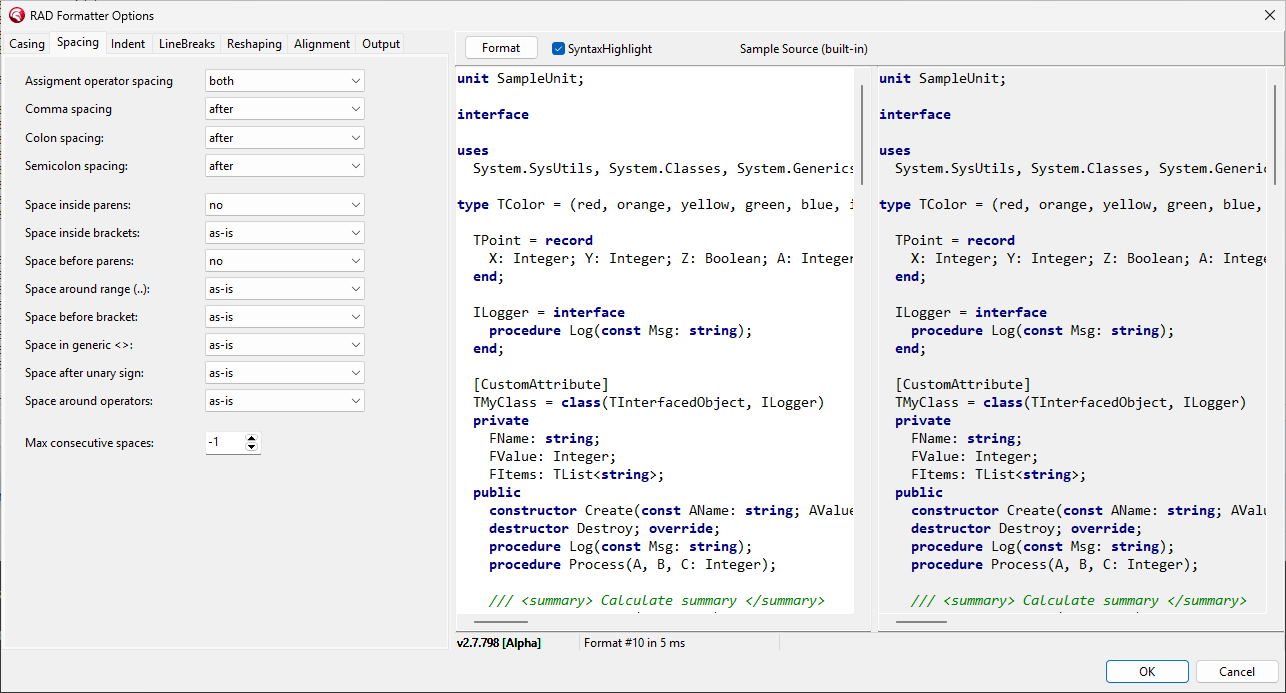
Press Ctrl+D in RAD Studio to format the
current unit — or just a selection. The plugin's split-screen config
editor previews every option live against your own source, and it writes the
same radFormatter.json the CLI uses, so the editor, the command
line, and CI all format identically. One installer covers every IDE from
Delphi 10.3 Rio through 13 Florence.
radFormatter tokenizes your source and builds a full Concrete Syntax Tree, then runs an owned-decision pipeline: each stage writes exactly one part of the output, and no stage can undo another’s work.
From your source to settled decisions — in this order
Indentation, case structure, generic parameters, and nested
control flow are driven by the parse tree, not line-based guesswork.
Every physical part of the emitted file has exactly one owner — line breaks, leading whitespace, interior padding. Decisions settle once, so stages never fight over the same character.
A profile is a named starting point. Whatever you pass with
-config is overlaid on top, so you only specify what you want to
change — from “touch nothing” to the full Embarcadero style guide.
Underneath are 68 options across eight sections, all in one
radFormatter.json. Commit it and every developer and CI job
formats identically.
The eight option sections — click any to browse its reference
| Profile | Intent |
|---|---|
| Default | Conservative: reindents and applies case structure, but
preserves spacing, casing, and user line breaks. The safest starting point. |
| FormatterExe | Approximates RAD Studio’s built-in Formatter.exe — active spacing, blank lines around sections, an 80-column right margin. |
| Embarcadero | The official Embarcadero Delphi style guide: lowercase keywords, one
uses entry per line, one statement per line, 160-column margin. |
| NoOp | Pass-through: output matches input byte-for-byte (modulo line endings). The least invasive way to adopt the formatter one rule at a time. |
Browse all 68 options → See all four profiles on the same input →
Format a file in place, rewrite a whole tree, or gate a pull request — with the same config everywhere.
# Format one file in place
> radFormatter source/MyUnit.pas

# Format a whole tree in place, with backups
> radFormatter -d source -r -b

# Generate a starter configuration
> radFormatter -writeDefaultConfig radFormatter.json# Fail the build if any file needs formatting
> radFormatter -check -config radFormatter.json -d source -r
# GitHub Actions
- name: Check formatting
run: radFormatter -check -config radFormatter.json -d source -rSettle formatting disputes once: commit
radFormatter.json to your repository and every developer and CI job
uses the same configuration. Full CLI reference →